Bring Your Own Data: Why Your CRM Shouldn't Mark Up Property Records
By Adam Kalimi · Published · 4 min read
Most real estate lead tools bundle two very different things into one bill: the software (the map, the CRM, the pipeline) and the data (property records, owner phone numbers, distress signals). The bundle is convenient — and it's also where the margin hides. When a tool sells you skip traces at $0.10–0.15 a record, it's usually buying them wholesale for a fraction of that. You're paying a data markup for the privilege of using their interface.
WhoseTitle takes the opposite approach: we sell the software, and you bring the data. Connect your own API key from the provider you already use (or sign up for one directly), and every discovery search and skip trace runs on your account, at your provider's rates. We never touch the money and never add a markup. This is usually called BYOK — bring your own key — and this post explains how it works, why we built it this way, and how to set it up.
How BYOK works in practice
Every major property-data provider issues API keys — the same credentials a developer would use to build against their platform. If you have an account with a provider, you can generate a key in their dashboard in a couple of minutes.
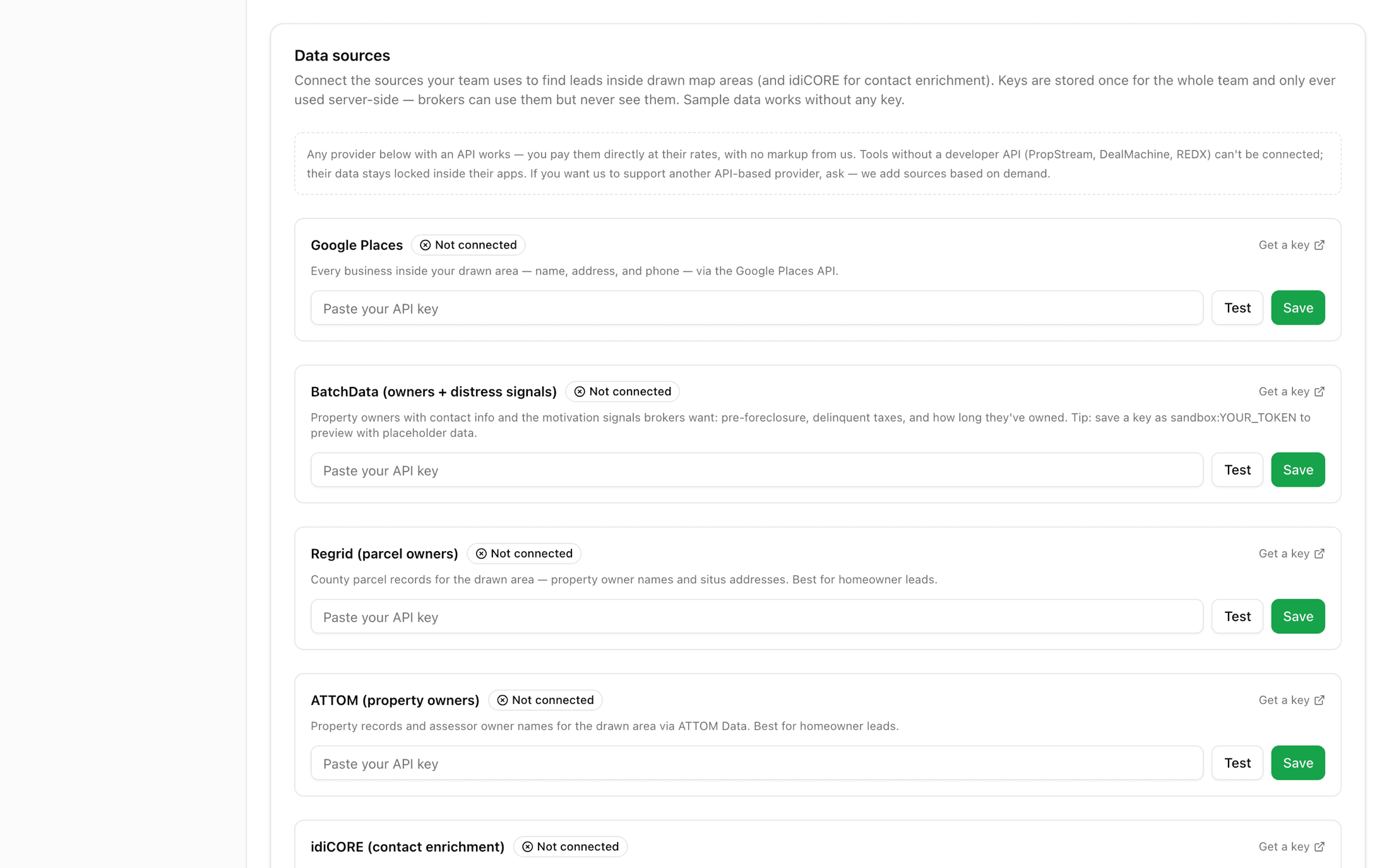
In WhoseTitle, the head broker pastes that key once in Settings → Data sources. From then on:
- You draw an area on the map — the discovery search runs against your provider, using your key, and the results land on your board.
- You enrich a lead — the skip trace hits your provider, your account is billed at your negotiated rate, and the phone numbers and emails attach to the lead.
- Your whole team shares the connection — keys are stored once per team and only ever used server-side. Your brokers can use the sources; they can never see or copy the keys.
There is no per-lead charge from WhoseTitle anywhere in that flow. The subscription covers the software; the data relationship is yours.
Why this is better than a bundled data plan
You pay wholesale, not retail. Data providers price by volume. A tool reselling skip traces has to add margin; connecting directly means their rate card is your rate card, and as your volume grows, you get the discounts — not your software vendor.
You own the relationship and the license. When your CRM buys the data, the usage rights sit with them, and leaving the tool usually means losing access. With BYOK, your provider agreement, your compliance posture, and your data history belong to you. Switch software tomorrow — your data account comes with you.
No double payment. Plenty of teams already pay for BatchData, idiCORE, or ATTOM through another workflow. A bundled tool makes you buy that data again. BYOK means one data bill, used everywhere.
Costs scale with usage, honestly. A quiet month costs you almost nothing in data. A bundled plan charges the same whether you pull 50 records or 5,000.
What you can connect today
| Provider | What it does in WhoseTitle | Key type |
|---|---|---|
| BatchData | Nationwide property discovery, owner data, distress signals, and skip tracing | API token from your BatchData account |
| idiCORE | Identity-grade skip tracing — phones, emails, and current addresses | API credentials from your idiCORE agreement |
| Regrid | Nationwide parcel boundaries and parcel data | API token from your Regrid account |
| ATTOM | Valuations, sale history, and property characteristics | API key from your ATTOM account |
| Google Places | Local business discovery inside your drawn area | Google Cloud API key |
One honest limitation: BYOK only works with providers that issue API keys. Closed apps — PropStream, DealMachine, REDX — don't offer personal API access, so there's no key to bring; their data stays inside their apps. If you use an API-based provider we haven't integrated yet, tell us — we add sources based on demand.
What you get without any key at all
You don't need a provider to start. WhoseTitle's own county coverage — owner names, property details, and sale history from public tax rolls across 1,000+ counties — is free, with no per-lead cost and no key required. Many teams run entirely on county data and only add a skip-trace key when they're ready to start calling owners. For how that enrichment step works and what it costs across providers, see our skip tracing guide.
Setting it up
- Sign up with a provider (or use the account you already have) and generate an API key in their dashboard.
- In WhoseTitle: Settings → Data sources, paste the key, and hit Test — we validate it against the provider before saving.
- Draw an area, pick the source, pull leads. Enrich when you're ready to call.
The software is one flat subscription — $45/month including your seat, $20 per teammate — and the data stays between you and your provider, at cost, forever.
Turn any neighborhood into a lead list
Draw an area on the map, pull every owner inside it, and work them through action plans — that's WhoseTitle.
Keep reading
- Skip Tracing for Real Estate: Find Any Owner's Contact Info
How skip tracing works for real estate prospecting: where the data comes from, what it costs, which providers agents use, and the compliance rules that apply.
- Free Property Owner Data: How to Pull It by County in Florida
Get property owner names, sale history, and equity signals free from public county records — how it works, which Florida counties are covered, and the limits.
- How WhoseTitle Scores a Homeowner's Likelihood to Sell
The exact signals behind WhoseTitle's seller likelihood score: ownership tenure windows, mortgage maturity, equity, distress records, and predictive data.